
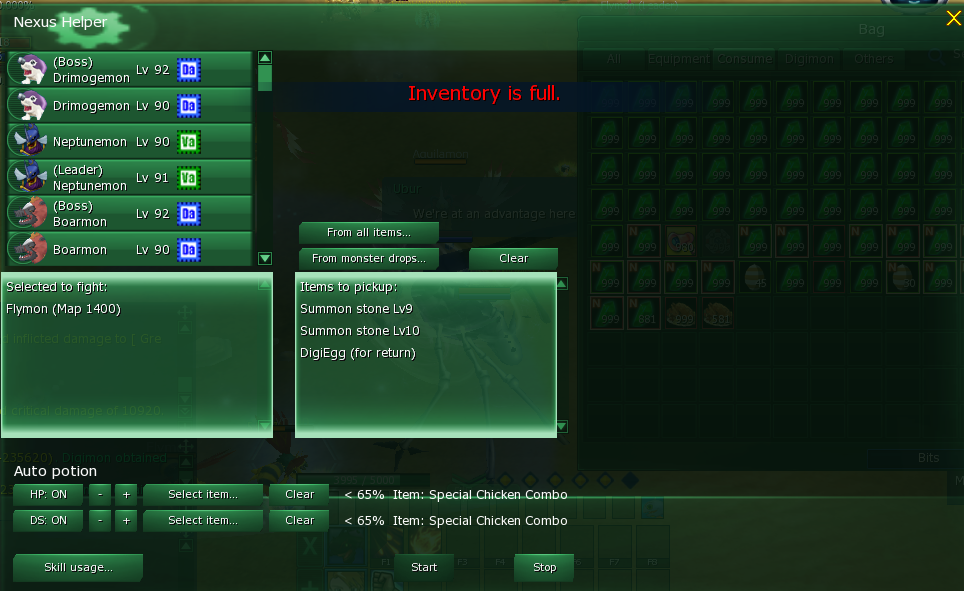
Nexus Helper (Built-In Auto Farm Feature)
Nexus Helper is the game’s built-in automation tool that helps you farm hands-free. It can:
- Auto heal HP (Auto Potion)
- Auto recover DS (Auto DS)
- Use an advanced item filter (pick only what you want)
- Let you set desired target Digimon
- Maintain a personal pickup list (your loot whitelist)
One of the best parts: it still works even when the game is minimized, so you can use your PC for other things while your character keeps farming.
1) Target Selection (Desired Targeted Digimon)
On the left side of the Nexus Helper window, you’ll see a list of Digimon you can choose from.
- Click a Digimon in the list to set it as your target.
- The selected target will appear in the Selected to fight section.
How it works:
Once the helper is running, it will focus on the Digimon you selected, making it easy to farm a specific spot without manually selecting enemies.
2) Auto Potion (HP Auto-Heal)
In the Auto potion section:
- Turn HP: ON to enable automatic healing.
- Set the HP trigger percentage using the – / + buttons.
- Click Select item… to choose which healing item the helper should use.
- Use Clear if you want to remove/change the selected item.
Example behavior (like shown in the UI):
If you set HP < 65%, the helper will automatically use the chosen item whenever your HP drops under 65%.
3) Auto DS (DS Auto-Recovery)
Right under HP is DS: ON, which works the same way:
- Turn DS: ON to enable automatic DS recovery.
- Adjust the DS trigger % with – / +.
- Choose the DS item with Select item….
- Use Clear to reset it.
How it works:
When your DS falls below your set threshold, the helper uses your selected item automatically.
4) Advanced Item Filter (Loot Control)
In the middle panel, Nexus Helper includes an item filter system so you can control what gets picked up.
You can choose the source:
- From all items… → browse a general list of items
- From monster drops… → focus on items that drop from monsters
Then you build your whitelist using:
Personal Pickup List (Items to pickup)
This section shows exactly what the helper will pick up.
Example from the UI:
- Summon Stone Lv9
- Summon Stone Lv10
- DigiEgg (for return)
How it works:
While the helper is active, it will only pick up items that you added into your Items to pickup list, keeping your farming clean and efficient.
5) Start / Stop
At the bottom:
- Start = begin automation using your current settings
- Stop = instantly disable the helper
You can freely adjust your target, potion thresholds, and pickup list, then hit Start again.


